In development. v0.1 is being built now; early access opens from the waitlist.

See every request your containers send each other.

snif is a native macOS app that watches the traffic between your Docker Compose services as it happens: who calls whom, how long each call takes, and which one made the whole request slow. No proxy, no SDK, no certificates, no changes to your containers.

Apple Silicon, macOS 27, OrbStack. Docker Desktop and Colima in v0.2.

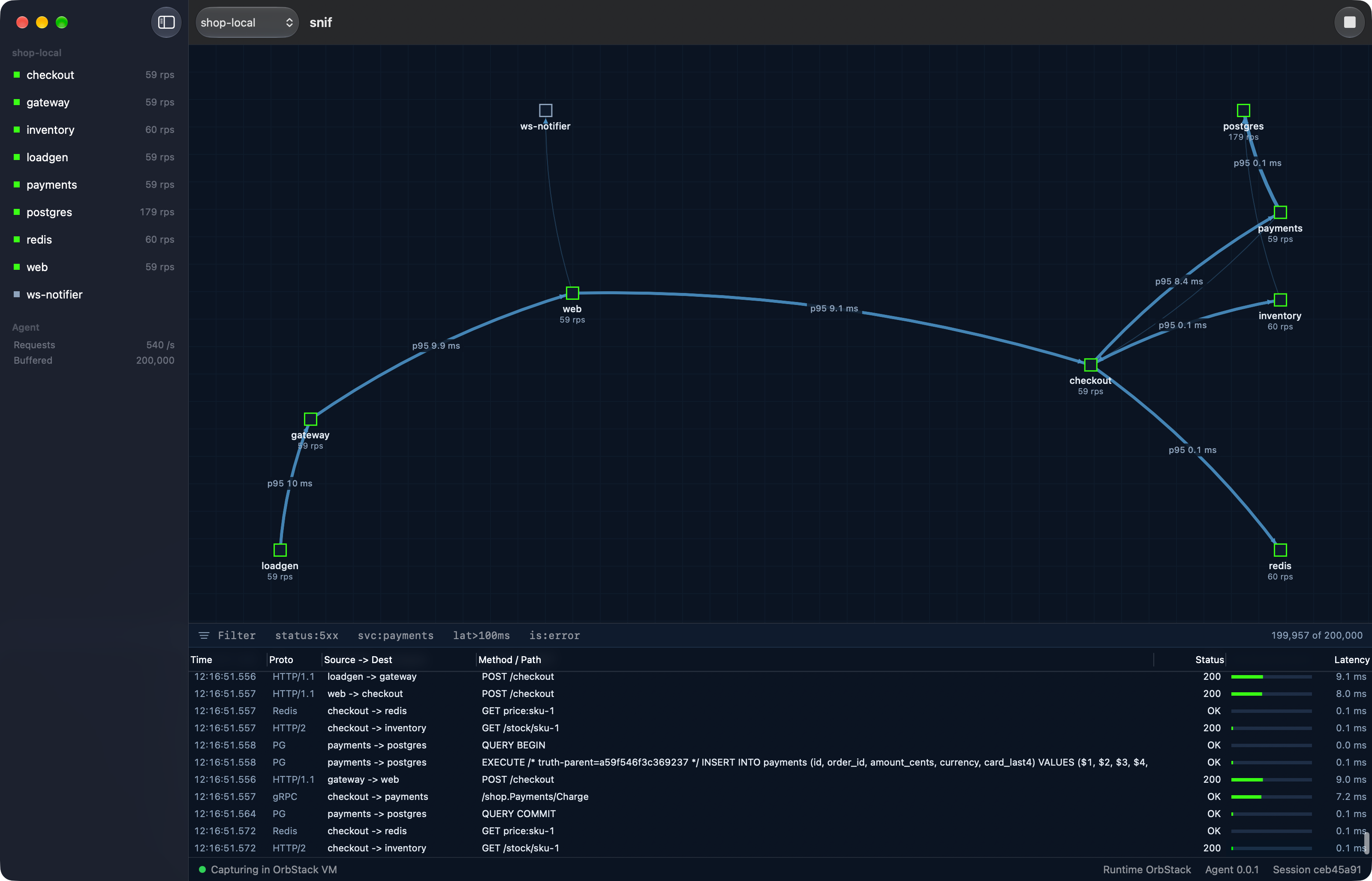
The snif window capturing the shop-local Docker Compose demo: a service map from loadgen through gateway, web and checkout to payments, inventory, redis and postgres, each edge labelled with its p95 latency, above a live table of HTTP/1.1, HTTP/2, gRPC, Redis and Postgres requests.
Real screenshot: snif v0.1 development build capturing the shop-local demo stack in OrbStack, November 2026. The moving squares are drawn by this page along the app's own edge curves; the app itself only shows the numbers.

From packet to cause in one window.

Start the capture and the map draws itself from real traffic within seconds. Every edge carries its own latency. Every row in the table is a real request, decoded from the wire.

Latency per edge, not per service

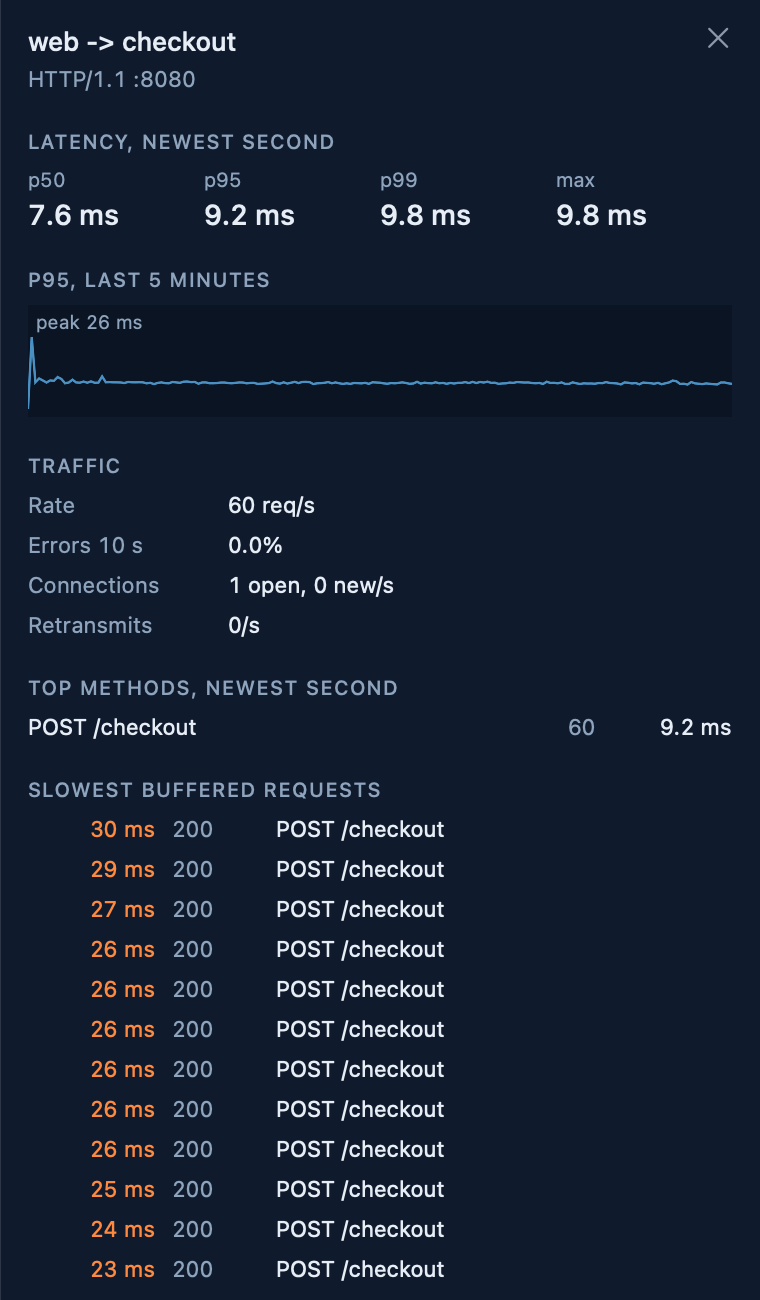
Click an edge to see p50, p95 and p99 for the newest second, five minutes of p95, request rate, errors, open and new connections, retransmits, the busiest methods and the slowest requests still in the buffer.

The service list in the sidebar turns orange when a service is slower than its own recent baseline.

Edge inspector for web to checkout over HTTP/1.1 on port 8080: p50 7.6 ms, p95 9.2 ms, p99 9.8 ms, a five minute p95 sparkline with a 26 ms peak, 60 requests per second, 0 percent errors, one open connection, and a list of the slowest buffered POST /checkout requests.
Real screenshot. Edge inspector, web to checkout.

A causal trace without instrumentation

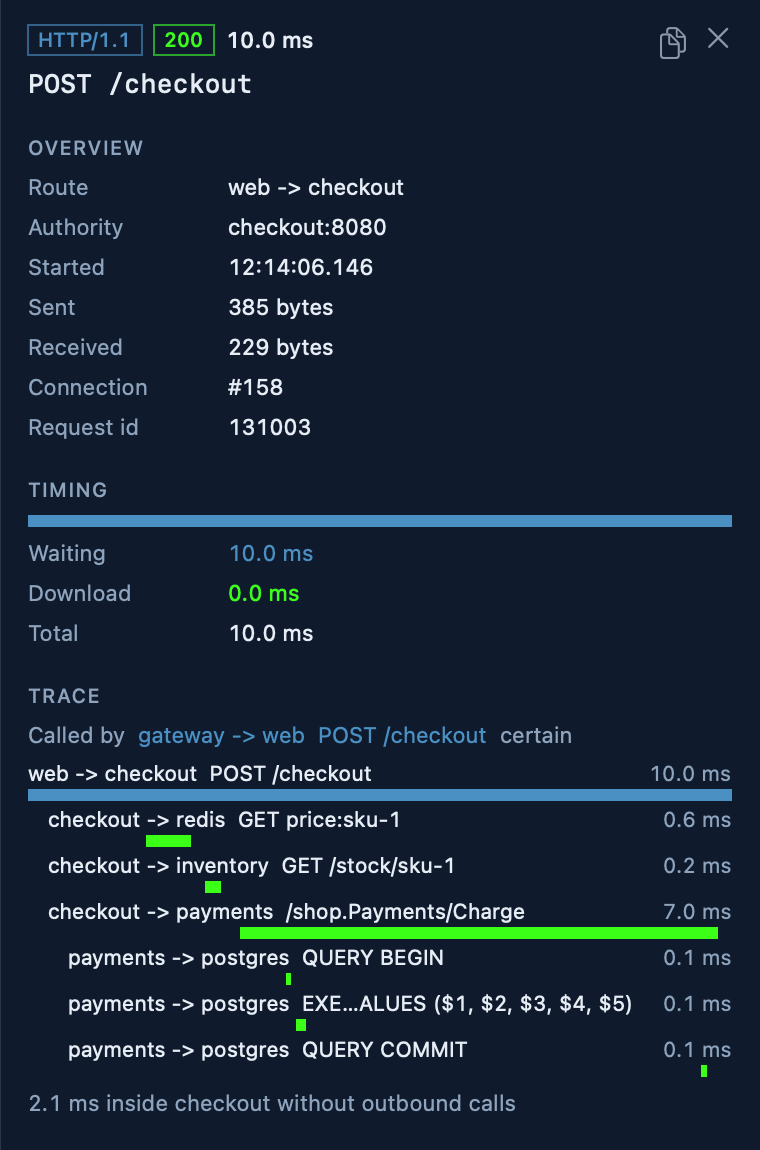
Pick a request and snif rebuilds the calls it caused, downstream through every service. When your services pass traceparent, x-request-id, b3 or grpc-trace-bin, links are certain. When they pass nothing, snif matches calls by timing and says so.

On our demo stack with header propagation switched off, the timing heuristic links 100% of calls correctly with one client and 74% with five concurrent clients. Links marked certain have been correct every time we checked.

Request inspector for POST /checkout from web to checkout, 10.0 ms, called by gateway with a certain link. The trace waterfall shows checkout calling redis GET price:sku-1 in 0.6 ms, inventory GET /stock/sku-1 in 0.2 ms and payments /shop.Payments/Charge in 7.0 ms, which in turn runs Postgres BEGIN, an INSERT and COMMIT. A note says 2.1 ms were spent inside checkout without outbound calls.
Real screenshot. One checkout across HTTP, Redis, HTTP/2, gRPC and Postgres.

gRPC and HTTP, down to the trailers

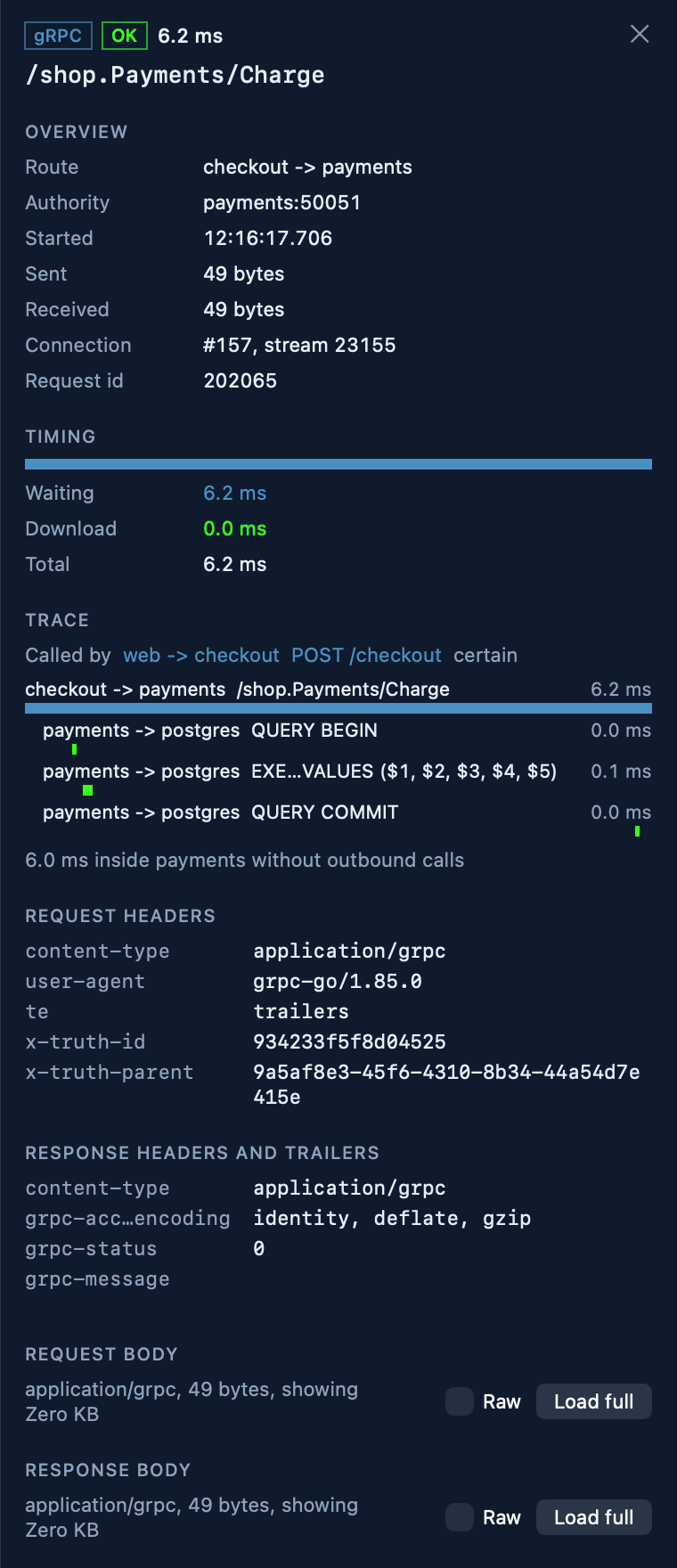
Method, status, timing, headers, gRPC trailers with grpc-status and grpc-message, body preview with the full body on demand, and Copy as cURL. HTTP/2 connections opened before the capture started are labelled as such, instead of showing guessed headers.

Decoding protobuf bodies through server reflection or your own .proto files is part of v0.1 and not in the build yet.

  • HTTP/1.1 Today
  • HTTP/2 Today
  • gRPC Today
  • Redis Today
  • Postgres Today
  • WebSocket v0.2
  • TLS plaintext v0.3
  • Kafka v0.3
Request inspector for the gRPC call /shop.Payments/Charge from checkout to payments on port 50051, status OK in 6.2 ms, connection 157 stream 23155. It lists request headers such as content-type application/grpc and user-agent grpc-go/1.85.0, response trailers with grpc-status 0, and the Postgres queries the call caused.
Real screenshot. A gRPC call with its trailers and its own downstream trace.

Filter like you think

Type what you are looking for. Terms combine; a leading minus negates.

svc:payments status:5xx lat>100ms -proto:grpc

Also is:error, src:, dst:, method:, status>=500, lat<=2s and free text.

Break it on purpose. Watch it break.

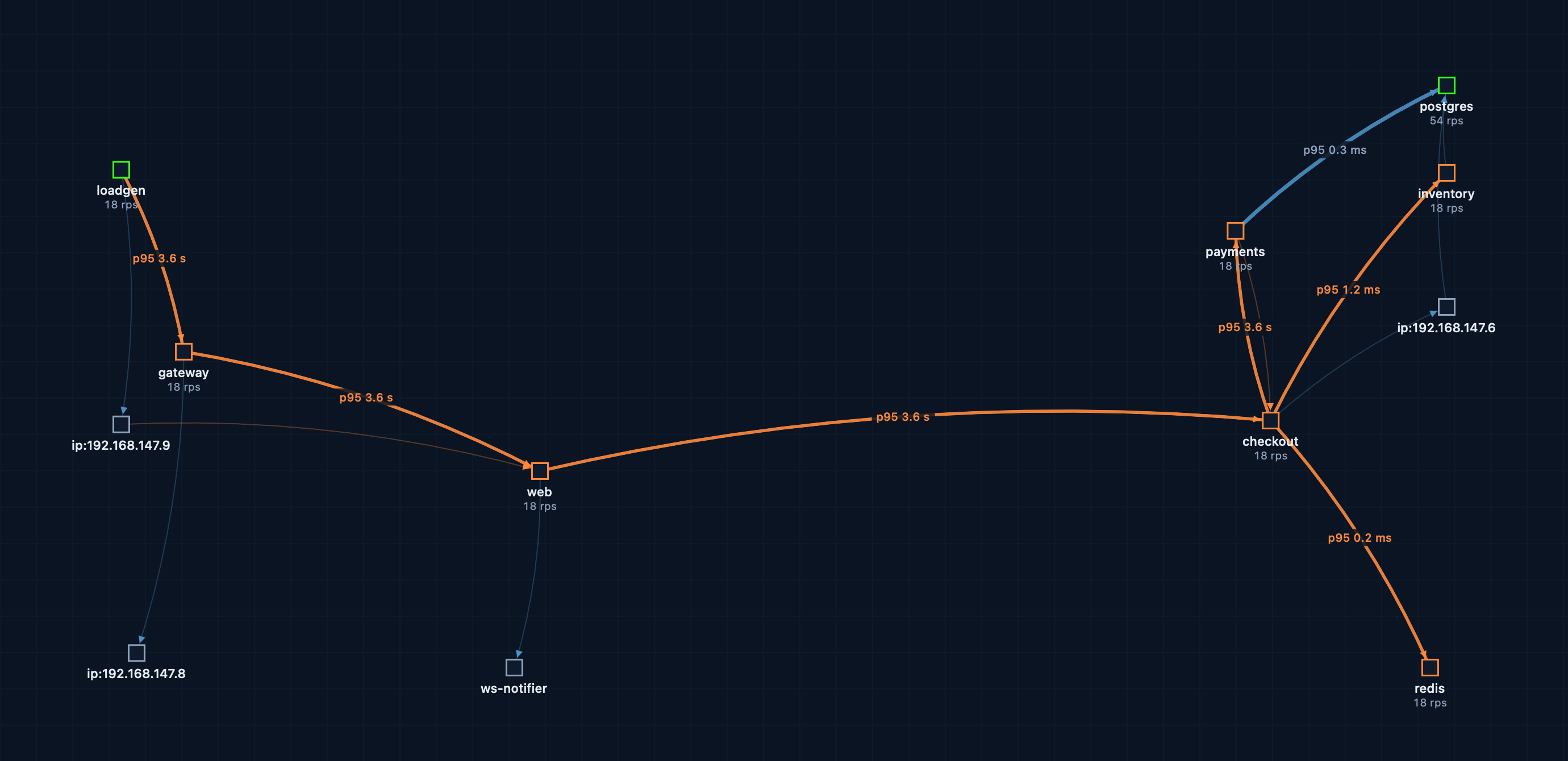
Chaos is the last large piece of v0.1 and is not in the app yet. Here is what it is for: below, a real capture of the demo stack's pool exhaustion scenario, where payments gets two database connections and twenty clients. The map turns orange and p95 on every hop from loadgen to payments jumps to 3.6 s.

The snif service map under load: payments is limited to two database connections, and the edges loadgen to gateway, gateway to web, web to checkout and checkout to payments are orange with p95 of 3.6 seconds, while checkout to redis stays at 0.2 ms and payments to postgres at 0.3 ms.
Real screenshot. Today this takes a script that reconfigures a container. In v0.1 it takes one click on an edge or in the menu bar.

Faults planned for v0.1

Latency
Add 300 ms, with or without jitter, to one container or to one edge such as checkout to payments.
Loss
Drop a percentage of packets and watch retransmits climb.
Partition
Cut two services off from each other in both directions.
Reset
Abort connections with TCP RST. HTTP 503 and gRPC UNAVAILABLE follow in v0.2.
Pause
Freeze a container for a while, then let it resume on its own.
Kill
Stop a container, with an optional restart after.

Built to clean up after itself

Every fault has a time to live, five minutes by default and sixty at most. It is written to a ledger before it is applied, and every tc and iptables rule carries a snif marker. A janitor removes expired or orphaned rules every ten seconds and on agent restart. Stop all faults is always one click away, and stopping the capture removes everything.

$ snif fault add latency --edge checkout:payments --ms 300 --ttl 2m

The snif CLI is planned for v0.2.

How it works

Containers on a Mac run inside a Linux VM, and their traffic to each other never reaches macOS. So snif comes in two parts that talk over a local gRPC connection.

Agent

A single Rust binary in a 20 MB image. It reads every packet on the containers' virtual interfaces with AF_PACKET, reassembles TCP, detects the protocol, parses requests and computes latency histograms per edge. On our test machine it uses 5 to 6% of one core and about 80 MB of memory at 1,000 requests per second.

App

A native Mac app, no Electron. It starts and stops the agent for you, draws the map in SwiftUI Canvas and the request table in AppKit, and keeps 200,000 requests in memory without dropping frames.

CLI

Planned for v0.2: the same contract from a terminal, for scripts and CI. Topology as JSON, faults on and off.

Status and roadmap

snif is not released. Everything marked done below runs today against a real Compose stack; everything else is planned and may change. Open a release to see the detail.

  1. Phase 0 Foundations and spikes Shipped
    • Done: Capture spike: AF_PACKET on container veths inside the OrbStack VM, byte exact at 200 MB/s with zero drops
    • Done: eBPF spike: aya programs load in the OrbStack VM in 3 ms and report TCP events with PID and cgroup
    • Done: UI spike: 119 fps topology and a 200k row table while ingesting 5,000 events per second
    • Done: gRPC contract between agent and app, shop-local demo stack, self-hosted CI
  2. v0.1 MVP for OrbStack Building now 6 of 11
    • Done: Agent in a privileged container: capture, TCP reassembly, per edge p50, p95, p99
    • Done: Parsers: HTTP/1.1, HTTP/2 with HPACK, gRPC, Redis RESP2 and RESP3, Postgres wire
    • Done: Live service map with latency labels and service health
    • Done: Request table with a filter language, request inspector, edge inspector, Copy as cURL
    • Done: Causal trace waterfall from trace headers or timing alone
    • Done: Fuzzed parsers: over 25 million runs, zero crashes
    • Not yet: Gap diagnosis hints, such as an exhausted connection pool
    • Not yet: Protobuf body decoding through server reflection or your .proto files
    • Not yet: Chaos: latency, jitter, loss, partition, reset, pause, kill, with TTL and Stop all
    • Not yet: Menu bar popover for chaos, Replay, Copy as grpcurl
    • Not yet: Pro history in local SQLite, signed and notarized DMG, updates, 14 day trial
  3. v0.2 More runtimes, more context Planned
    • Not yet: Docker Desktop and Colima
    • Not yet: eBPF socket tracer: process and thread context, host network services
    • Not yet: WebSocket frames
    • Not yet: Abort as HTTP 503 or gRPC UNAVAILABLE through a built in fault proxy
    • Not yet: Session export and import, the snif CLI, a Transparency panel listing every command the agent runs
  4. v0.3 TLS, Kafka, native processes Planned
    • Not yet: TLS plaintext through uprobes on OpenSSL, BoringSSL and Go crypto/tls, never by swapping certificates
    • Not yet: Kafka
    • Not yet: Latency baselines and anomalies, before and after session compare
    • Not yet: Chaos profiles and a scheduler
    • Not yet: Processes running natively on your Mac, such as npm run dev, as nodes on the map
  5. v1.0 Kubernetes and teams Planned
    • Not yet: Local Kubernetes: minikube, kind, OrbStack Kubernetes
    • Not yet: HTTP/3, best effort
    • Not yet: Podman machine
    • Not yet: Team license with shared chaos profiles and exports, as files, not a cloud service

Bar length is the planned amount of work per release, not a calendar. We publish dates once a release is close.

Pricing

Watching is free, with no time limit. You pay when you act on what you see, keep it, or take it with you. Planned prices for launch, in US dollars.

Free

0 USD

To look around your stack.

  • Live capture with no time limit
  • Service map with p50, p95, p99 and bottlenecks
  • Request stream with 15 minutes of history, in memory only
  • Full detail for the first 1,000 requests of a session
  • One Compose project at a time
Join the beta list

Pro

89 USD per year

or 9 USD per month. Per developer, up to 3 Macs. 14 day trial.

  • Everything in Free, with no detail limit
  • Chaos: latency, loss, partition, reset, pause, kill
  • Causal trace with diagnosis, Replay, Copy as cURL and grpcurl
  • Local history in SQLite, as long as you choose, on any disk
  • Save and open sessions, export HAR, pcap and JSON
  • Several Compose projects at once
Get early access

A team license with shared chaos profiles is planned with v1.0.

Questions

What do I need to run it?

A Mac with Apple Silicon on macOS 27, and OrbStack. Docker Desktop and Colima are planned for v0.2. Your services run unchanged in Docker Compose.

Do I have to change my containers, set a proxy or install a certificate?

No. snif reads packets on the virtual network inside the Linux VM that runs your containers. Nothing sits in the request path and nothing in your images changes.

Why does it need a privileged container?

Container to container traffic never leaves the Linux VM, so macOS cannot see it. The snif agent runs inside that VM with the rights to read the virtual network interfaces and, for chaos, to apply tc and iptables rules in a container network namespace. It listens only on 127.0.0.1 and requires a per session token from the app.

Does any captured data leave my Mac?

No. Traffic, history and exports stay on your machine. There is no telemetry. The app will connect out only to check for updates and, for Pro, to verify a license, with 30 days of offline grace.

What about HTTPS between my services?

Encrypted traffic shows up as connections with timing, not content. Plaintext through uprobes on OpenSSL, BoringSSL and Go crypto/tls is planned for v0.3. snif will never decrypt by swapping certificates.

Can I see processes I run directly on macOS, like npm run dev?

Not yet. Native processes as nodes on the map are planned for v0.3, through a small privileged helper on the Mac.

Is it open source?

No. snif is commercial software from RealSec. You will get a signed, notarized app and an agent image the app verifies by digest. Trust comes from transparency instead: a public description of what the agent does, and a Transparency panel (v0.2) that logs every network change it makes.
Your stack already knows why it is slow.

snif lets you see it. Get on the early access list and we will write when the beta opens.